Credits & Usage
The Credits & Usage section provides comprehensive visibility into how platform credits are consumed across the system. It helps users monitor usage trends, track limits, and understand system activity at both organizational and user levels.
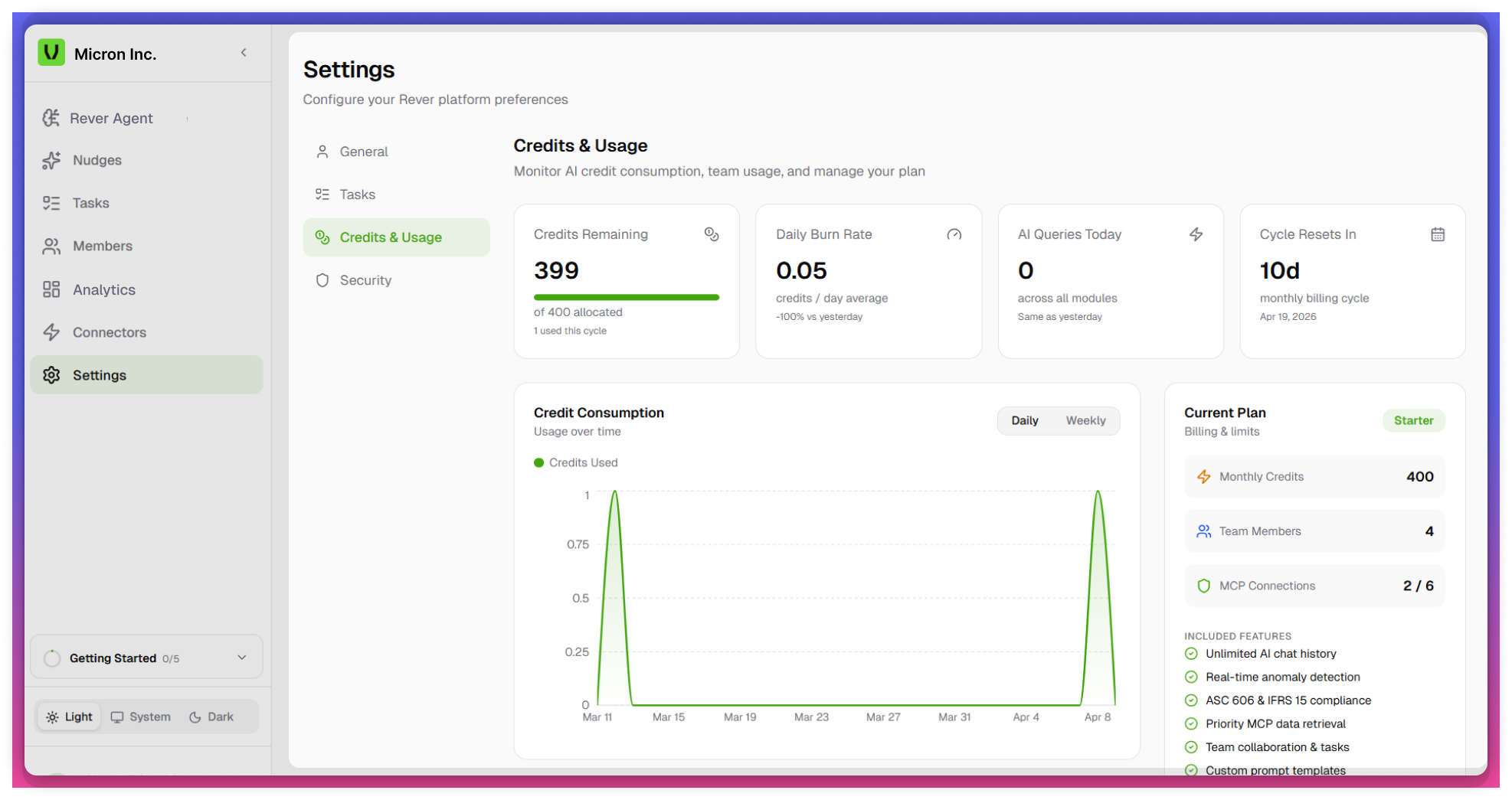
Accessing Credits & Usage
- Navigate to the Settings module from the left navigation panel.
- Select Credits & Usage.
- The dashboard will display multiple widgets and charts related to credit consumption.
Key Features
Credit Remaining Dashboard
Provides a high-level summary of available and consumed credits.
Metrics Displayed
- Total Credits Allotted
- Credits Used
- Credits Remaining
Additional Insights
- Daily Burn Rate (Average)
- Shows the average number of credits consumed per day.
- Helps estimate how quickly credits are being utilized.
tip
Regularly monitor the Daily Burn Rate to avoid exhausting credits early.
- Queries Per Day (Organization Level) - Displays the number of queries executed daily across the organization.
- Billing Cycle Remaining Days - Indicates the number of days left in the current billing cycle.
Credit Consumption Chart
Visualizes credit usage trends over time.
Features
- Sorting Options
- Daily View - Displays day-wise credit consumption
- Weekly View - Displays aggregated weekly usage
Current Plan Details
Displays key information about the active subscription plan.
Details Included
- Total MCPs Connected
- Total Team Members
- Monthly Credits Allotted
tip
Keep track of billing cycle days to plan usage effectively.
Credit Usage by Team Member
Provides a breakdown of credit consumption at an individual user level.
Insights
- Credits used by each team member
- Helps identify high-usage users
tip
Use team member insights to manage and optimize individual usage.
Credit Consumption by Feature
Shows how credits are consumed across different platform features.
Insights
- Feature-wise credit usage distribution
- Highlights which features consume the most credits
note
- Credit consumption depends on queries and feature usage.
- Access to this section may be restricted based on user roles.